Friday, 28 March 2014

how to logon to servicemarketplace

http://scn.sap.com/docs/DOC-47096#jive_content_id_How_do_I_register_for_SAP_Service_Marketplace

Tuesday, 25 March 2014

UK payroll main schema and its directory

UK PAYROLL MAIN SCHEMA

THIS IS UK PAYROLL MAIN SCHEMA
SUB SCHEMA==>XINO

The subschema comprises the following main steps:

1.  Specify program type (payroll or evaluation)

2.  Set switch for database updates (YES/NO) All database updates are
    controlled via this switch (otherwise simulation)

3.  Only infotypes from the HR master record which apply to the selected
    personnel number are read.

4.  All Time Management infotypes are imported.

5.  Specify check against control record PA03 (test or live).

THE SUB SCHEMA 


PGM
Function PGM provides the payroll driver with information on the type of
program represented by the schema in question.

ABR         Payroll

UPD==>UPDATING  DATE BASE
OPT==>READING  USED INFO TYPES
OPT==>IMPORTING  TIME INFO TYPES

SUB SCHEMA  GBDO


ENAME==>READS DATE FROM 0001 AND 0002
WPBP==>READS DATA FROM 000,0001,0007,0008 AND 0027
GBIT8==>SUMMARIZING ALL BASIC PAY WAGE TYPES IN  /250
P0071==>READS DATA FROM 0071 INFO TYPE
                 The function P0071 is necessary to read the employee pension fund contributions data which is required as part of the gross data.

P0065
The function P0065 is necessary to read the employee tax data which is required as part of the gross data.

P0222
The function P0222 is necessary to read the employee company car data
and company car unavailability data which is required as part of the
gross data.

P0014
Function P0014 evaluates the master data in the Recurring Payments and
Deductions infotype (0014).

PCR==>GW14
IT IS WORKING AS PER PRCL 47

                 IF WAGE TYPE IS PROCESSED IN PRCL 47 ITS SPECIFICAITON P,IT IS SPLIT INWPBP


We provide  excellent sap hcm training with indpeth concept

for more deatils
plz free to call   
9912223430

catch me @   madhupayroll@gmail.com

Tuesday, 18 March 2014

GARNISHMENTS


US Garnishments 

General Information

Q1. What is a garnishment?
A1. Garnishments are payroll deductions which differ from other types of deductions in that they are governed by government and judicial rules. They are compulsory for both the employee and employer.  The employer generally is liable for 100% of the amount it fails to withhold pursuant to a garnishment order and penalties and punitive damages can be imposed for failure to properly comply with the terms and conditions of an order.
Q2. How is a garnishment initiated and what is the process?
A2. Generally, an employee experiences financial trouble and a court mandates an order that stipulates the deduction amount and frequency which is received by the employee's HR department, the information is then entered into R/3, the amount is deducted when processing RPCALCU0, the vendor is paid via Third Party Remittance and the employee and vendors are notified of these deductions through automatically generated letters.
Q3. What types are garnishments are there?
A3. R/3 handles 5 main categories:
         Support (child, spousal, and medical)
         Creditor
         Federal debts (student loans and administrative wage garnishments (AWG))
         Federal and State Tax Levies
         Voluntary Garnishments
Q4. What is the difference between Exempt and Non-Exempt amounts?
A4. The exempt amount is the amount which cannot be taken to satisfy a garnishment and the non-exempt amount is the amount that can be taken.
Q5. How is the exempt and non-exempt amounts calculated?
A5. Various rules apply based on the type and priority of the garnishment.  There are Federal and State rules and the state rules will vary from state to state.
Q6. What if an employee has multiple garnishments?
A6. Garnishments are processed based on priority rules. Generally, child support orders have the highest priority, Federal Tax Levies have the second highest priority and then other types of garnishments are on a first come, first serve basis.

Infotypes

Q7. What infotypes are used within R/3?
A7. There are three infotypes designated for garnishment processing.
       IT0194 - Garnishment Document
       IT0195 - Garnishment Order
       IT0216 -  Adjustments
The document information is entered on IT0194 and the actual deduction amount and frequency is entered on IT0195.  The two infotypes are linked via a system generated internal number and you can have multiple orders (IT0195) for one document (IT0194) and these are linked via a system generated sequence number.  Infotypes 0195 and 0216 can only be created once an IT0194 record has been created and saved.  For processing purposes, RPCALCU0 reads IT0195.
Q8.  How do I make changes to an existing Garnishment Order (IT0195)?
A8. With Edit -> Copy, you can make changes to the Order, but keep the same sequence number and maintain a history in the system.  With selecting Change, you can make changes but no history is maintained. Also, a change can be made through creating a new IT0195 which maintains history, however a new sequence number is generated and the order is now processed as a separate order in R/3 and does not cumulate as part of the original order.  IT0195 should always be accessed via IT0194 when making changes.
Q9. When should I use the Adjustment IT0216?
A9. IT0216 should be used to correct errors in RPCALCU0; additional deductions are required; to enter a new balance; refund from vendor; exceptional payments; separate calculation; calculate end date; or stopped vendor payment.

Customizing

Q10. What are the relevant tables for Garnishment Processing?
A10.  T5UG0 - Garnishment Order Types
          T5UG1 - Garnishment Categories
          T5UG2 - Adjustments to the Disposable Net
          T5UG3 - Model for the Non-exempt amount
          T5UG4 - Rules for calculation of Non-exempt amount
          T5UG5 - Model Key and Text for Adjustments to the Disposable Net
          T5UG6 - Government Rules for Service Charges
          T5UG7 - Government Rules for 3PR
          T5UG8 - Company Rules for 3PR
          T5UG9 - Garnishment Default Values
          T5UGA & T5UGB - Special Rules for the Calculation of the Non-exempt amount
          T5UGA - Rule Key/Names & Texts for special variables to display on IT0195 screen
          T5UGB - Sequence of Operations to be performed
          T5UGC - Service Chg Rule Key and Text for Country/State/Document category combination
          T5UGD - Levy Form - Filing Status listed
          T5UGE & T5UGF - Levy Form - Exempt amount and additional exempt amount for each filing status
          T5UGG - Company Rules for Service Charges
          T5UGH - Levy Form - Forms Defined
          T5UGI - Letters - Select Form & User exit for letter type
          T5UGJ & T5UGK - Not Customizing Tables, used for the Printing Request for the Notice and Answer Letters
          T5UGL - Letters - Definition & location of user exit
          T5UGM - Garnishment Originator on IT0194

Payroll Processing

Q11. What are the wage types associated with Garnishments?
A11. /G00 - Disposable Net
         /G01 - Gross for Garnishment
         /G02 - Completely Non-exempt
         /G03 - Garnishment Total Amount Deducted
         MG10 trough MG70 delivered templates for Garnishments to be taken
Q12. What are the Garnishment Cluster Tables and what do they  represent?
A12. GRDOC - corresponds to garnishment document (IT0194)
         GRORD - corresponds to garnishment order (IT0195) or garnishment adjustment (IT0216)
         GRREC - actual deductions and wage types and also used to carry forward results
Q13. Where are garnishments calculated in RPCALCU0?
A13. Garnishments are processed via the schema UGRN following the calculation of taxes (UTX0).  The actual amount to be taken is calculated with the function UGARN.
Q14.  What is the main garnishment Include?
A14.  The main garnishment include is RPCPIUU0 - forms called by UGARN.  Also of importance is RPCPIUF0 - function UGARN.

Quick Tips for Troubleshooting Garnishment Processing

Q1.  What are some items to check when troubleshooting Garnishment Processing in R/3?
A1: Review the following:
  • On IT0194, check the validity dates, determine what kind of garnishment, how many are involved and the status of the garnishment (e.g. active, pending).
  • Check the IT0195 validity dates and note the Remit Rule, deduction amount, frequency and how many IT0195's are involved.
  • Review RPCLSTRU and the payroll dates in question, keep in mind the information found on IT0195 and the Garnishable period is from the beginning of the pay period to the actual check date.  Garnishments are deducted based on the check date.
  • Within the EE's results, also check for wage types /G00, /G01, /G02 and /G03 and the wage type for the garnishment to see how much was deducted.
  • Still within the EE's results, review the GRORD record and check the limit, disposable net, month to date, deduction to vendor (DEVEN) and the deduction from infotype (DEINF).
  • Multiple garnishment processing, be sure the system can legally take all the garnishments.
  • Check schema UGRN for any customer modifications.
  • Double check that Notes have been applied correctly and completely.
  • Review the Garnishment History either via IT0194 or IT0195 which lists the actual deductions taken with the check date.
  • Also via IT0194 or IT0195, you can view Customizing details (Environment -> Customizing details; 4.6C Extras -> Customizing Review)
  • Both the Disposable Net and calculated Net Pay should be the same.
Q2. Why was an IT0216 record not processed?
A2. IT0216 can be edited or deleted before running payroll.  If payroll is run and there is no wage type listed on IT0216, this record will not be read nor will it be posted to FI.
Q3.  Why does a deduction occur after the initial balance has been met?
A3.  It is most likely misconfiguration of the Order Category (table T5UG0).  Usually, it is a State Levy that has been given the Order Category of a Federal Levy. A State Levy should have the Order Category '3' for Generic in table T5UG0.  The order category '2' Levy only applies to a Federal Levy.  Also, a Federal Levy will not stop when an initial balance is reached because by law, it can only be manually stopped by changing the status of IT0194 to '4' Released, once the company has received Form 668-D from the IRS.  (Please Review Related Note 521735.)
Q4.  How is General Disposable Net calculated?
A4.  There are two ways to calculate general Disposable Net (/G00).Either start with the gross amount (/101) and subtract exempt amount or start with 0 and add up all the earning wage types to be included (e.g. M003).  This is configured via PRCL 59, double check the values for the wage types in question for this PRCL. A useful tool for checking Processing Classes for wage types is program RPDLGA20 (choose the Output radio button 'Tree Structure').
Q5.  How are garnishments and Arrears handled?
A5.  Garnishments do not follow the same Arrears principles as other deductions.  The arrears functionality for garnishments only refers to deductions within a particular month.  If the total amount of a garnishment cannot be taken for the month, the remaining amount does not carry forward to the next month. The values for Arrears processing are set in table T51P6 and for all garnishment wage types, the value for Arrears should be a '4' and the Retro column should be blank in this table.(Please see Note 338841.)
Q6.  Can Garnishment wage types be entered on a NAMC (IT0221)?
A6.  No, Garnishment wage types cannot be entered on IT0221.There is a V0 split indicator that connects garnishment Wage types  to garnishment tables and there is no V0 split on IT0221.
Q7.  How are garnishmnents handled during Retroactive Accounting?
A7.  Garnishments will not recalculate in a retrocalculation.  The amount originally deducted continues to be carried forward. Consequently, no retroactive changes should be performed for garnishments.  If changes need to be made, perform an EDIT - >COPY operation that will result in delimiting the IT0195 record.
Q8.  What do I check for priority issues; double, incorrect or missing deductions?
A8.  First check IT0194 and IT0195 and their validity dates and priority.  Make sure the Rule in IT0195 was customized to do what is expected.  Look at the Disposable Net and Non-exempt  models.
Q9.  What should I check if Payroll Abends within UGARN?
A9.  Check the payroll results GRREC for a record without a wage type.
Q10.  Is it possible to specify a percentage or portion of a wage type?
A10.  At this time, the garnishment module does not offer a functionality that would allow specifying a percentage and/or portion of a wage type to be deducted other than from gross and net.  The workaround is to create a special rule with the garnishment orders having different priorities and different IT0194 records.
FEDERAL WAGE GARNISHMENT LAW

What is wage garnishment?

Wage garnishment is a legal procedure through which earnings of an individual are required to be withheld by an employer for the payment of a debt.  Most garnishments are made by court order.

Which federal law regulates wage garnishment?

Title III of the Consumer Credit Protection Act limits the amount of an employee's earnings which may be garnished and protects an employee from being fired if pay is garnish-ed for one debt.  This law is administered by the Wage and Hour Division of the Department of Labor's Employment Standards Administration.

To whom does the law apply?

The law protects everyone receiving personal earnings, i.e., wages, salaries, commissions, bonuses, or income including earnings from a pension or retirement program.  Tips are not considered earnings for the purposes of the wage garnishment law.
The law does not affect voluntary wage assignments - that is, situations in which workers voluntarily agree that their employers may turn over some specified amount of their earnings to a creditor or creditors.
The law applies in all 50 states, the District of Columbia, Puerto Rico, and all U.S. territories and possessions.

What is the protection against discharge when wages are being garnished?

The law prohibits an employer from firing a worker whose earnings have been subject to garnishment for any one debt, regardless of the number of levies made or proceedings brought to collect it.  The law does not prohibit discharge if the employee's earnings have been garnished for second or subsequent debts.

What are the restrictions on wage garnishment?

The amount of pay subject to garnishment is based on an employee's "disposable earnings" which is the amount left after legally required deductions have been made for federal, state, and local taxes, Social Security, unemployment insurance, and State employee retirement systems.
Other deductions, such as those for union dues, health and life insurance, contributions to charitable causes, voluntary wage assignments, purchases of savings bonds, and payments to employers for payroll advances or purchases of merchandise, are not required by law and may not be subtracted from gross earnings when calculating the amount of disposable earnings.
The law sets the maximum amount which may be garnished in any workweek or pay period, regardless of the number of garnishment orders received by the employer.  The amount may not exceed the lesser of two figures:
25 percent of the employee's disposable earnings, or the amount by which an employee's disposable earnings for the workweek are greater than 30 times the federal minimum wage  (now $4.25 an hour).

For illustration, if the pay period is weekly and disposable earnings are $127.50 or less there can be no garnishment.  If disposable earnings are more than $127.50 but less than $170, the amount above $127.50 can be garnished.  If disposable income earnings are $170 or more, a maximum of 25 percent can be garnished.  When pay periods cover more than one week, multiples of the weekly restrictions must be used to calculate the maximum amounts that may be garnished.

What about child support and alimony?

Specific restrictions apply to court orders for child support or alimony.  The garnishment law allows up to 50 percent of a worker's disposable earnings to be garnished if the worker is supporting another spouse or child, and up to 60 percent for a worker who is not.  An additional 5 percent may be garnished for support payments more than 12 weeks in arrears.

Are there any exceptions to the law?

The wage garnishment law specifies that garnishment restrictions do not apply to bankruptcy court orders and debts due for federal or state taxes.
If a state wage garnishment law differs from the federal law, the law resulting in the smaller garnishment must be observed.

For more information about the federal wage garnishment law...
Contact the nearest office of the Wage and Hour Division, listed in most telephone directories under U.S. Government, Department of Labor, Employment Standards Administration.
This is one of a series of fact sheets highlighting U.S. Department of Labor Programs.  It is intended as a general description only and does not carry the force of legal opinion.

We are providing  excellent sap hcm  online / in house training with real time scenarios with BBP preparation,Test scripts,transportation,authorizations,uploading master data with LSMW,

FOR MORE DETAILS
mail: madhupayroll@gmail.com
mobile numbers
91+9912223430
91+9948932100

Thursday, 27 February 2014

How do we upload data from non sap to sap

LSMW which is an SAP tool (transaction LSMW) which allows you to record a transaction and upload a file of data using the recording.

- An external tool such as WinShuttle or Quadrate which are a bit easier to use and more flexible.

- Write an ABAP from scratch using built-in BAPI's or function modules for the transaction(s) you need to use.

SE16 is not an upload tool, and SM30 (SAP table maintenance tool) will not update all the tables that an SAP transaction hits at the same time.

As for the connection between FileZilla and SAP, you should be able to find out from the vendor how to extract data to a flat file. They should also be able to tell you the connections you're looking for. If they can't you will have to do the analysis on your own. 


us payroll tax wage types

US PAYROLL TAX WAGE TYPES

/401        TX Withholding Tax

/402    31.12.9999    TX Earned Income Credit P
/403    31.12.9999    TX EE Social Security Tax
/404    31.12.9999    TX ER Social Security Tax
/405    31.12.9999    TX EE Medicare Tax
/406    31.12.9999    TX ER Medicare Tax
/407    31.12.9999    TX State Unemployment Ins
/408    31.12.9999    TX Social Charge Tax
/409    31.12.9999    TX ER Special Payroll Tax
/410    31.12.9999    TX ER Unemployment Tax
/411    31.12.9999    TX ER Debt Repayment Tax
/412    31.12.9999    TX ER Old Fund Liability
/413    31.12.9999    TX Er Emplmt Security Enh
/414    31.12.9999    TX Er Re-emplmt Placemt T
/415    31.12.9999    TX Er Job Devmt Assessmt
/416    31.12.9999    TX Employment Training Ta
/417    31.12.9999    TX ER Health Insurance Ta
/418    31.12.9999    TX ER Workforce Devlmt Tx
/419    31.12.9999    TX Payroll Expense Tax
/420    31.12.9999    TX EE Unemployment Tax
/421    31.12.9999    TX EE Debt Repayment Tax
/422    31.12.9999    TX EE Old Fund Liability
/423    31.12.9999    TX EE Health Insurance Ta
/424    31.12.9999    TX EE Workforce Devlpmt T
/425    31.12.9999    TX EE Hlth, Disbility & W
/426    31.12.9999    TX EE Chauffers License F
/427    31.12.9999    TX ER Chauffers License F
/428    31.12.9999    TX ER Hlth, Disbility & W
/429    31.12.9999    TX Special Admin Reserve
/430    31.12.9999    TX ER Worker Compesatn Tx
/431    31.12.9999    TX ER Disability Tax
/432    31.12.9999    TX ER Accident Fund Tax
/433    31.12.9999    TX ER Medical Aid Fund Ta
/434    31.12.9999    TX ER Suplmtal Pension Tx
/435    31.12.9999    TX Transit  District Exci
/436    31.12.9999    TX Dislocated Worker Asse
/437    31.12.9999    TX Administrative Conting
/438    31.12.9999    TX Employer Investment Fe
/439    31.12.9999    TX Employment Administrat
/440    31.12.9999    TX EE Worker Compensation
/441    31.12.9999    TX EE Disability Tax
/442    31.12.9999    TX EE Suplmtal Pension Tx
/443    31.12.9999    TX EE Medical Aid Fund Ta
/444    31.12.9999    TX EE Sen Cit/mntal Hlt
/445    31.12.9999    TX EE Senior Citizen Tax
/446    31.12.9999    TX EE Mental Health Tax
/447    31.12.9999    TX Joint Economic Dev. Di
/448    31.12.9999    TX EE Voluntary Disabilit
/449    31.12.9999    TX EE Sen Cit/Mntal Hlt/T
/450    31.12.9999    TX EE Transportation Tax
/451    31.12.9999    TX EE Occupation Tax
/452    31.12.9999    TX ER Head Tax
/453    31.12.9999    TX EE School Tax
/454    31.12.9999    TX ER Occupation Tax
/455    31.12.9999    TX EE Railroad Rtmt Tier1
/456    31.12.9999    TX EE Railroad Rtmt Tier2
/457    31.12.9999    TX ER Railroad Rtmt Tier1
/458    31.12.9999    TX ER Railroad Rtmt Tier2
/459    31.12.9999    TX EE Railroad Rtmt Tier1
/460    31.12.9999    TX ER Railroad Rtmt Tier2
/461    31.12.9999    TX Ss. EE Retirement Plan
/462    31.12.9999    TX Ss. EE Retirement Plan
/463    31.12.9999    TX Mass. ER Retirement Pl
/464    31.12.9999    TX Mass. ER Retirement Pl
/465    31.12.9999    TX Employer Supplemental
/470    31.12.9999    TX Pension Periodic Withh
/471    31.12.9999    TX Pension N.P. Eligible
/472    31.12.9999    TX Pension N.P. Nonqualif
/473    31.12.9999    TX Premature Dist From Qu
/475    31.12.9999    TX Job Development Fee
/476    31.12.9999    TX City Service Fee
/477    31.12.9999    TX ER Voluntary Disabilit
/478    31.12.9999    TX Unemployment Surcharge
/479    31.12.9999    TX Wage And Salary Tax
/480    31.12.9999    TX ER Wage Security Fund
/481    31.12.9999    TX Disability Insurance V

====================================

/5--    31.12.9999    Net
/550    31.12.9999    Statutory net
/551    31.12.9999    Retrocalc.difference
/552    31.12.9999    Difference prev. Period
/553    31.12.9999    Recalc.diff.to last payr.
/557    31.12.9999    Cash payment
/558    31.12.9999    Payment of balance
/559    31.12.9999    Payment
/560    31.12.9999    Amount to be paid
/561    31.12.9999    Claim
/562    31.12.9999    Amount of balance paid
/563    31.12.9999    Claim from prev. period
/564    31.12.9999    Advance payment
/565    31.12.9999    Carry-over for next per.
/566    31.12.9999    Carry-over from prev.per.
/568    31.12.9999    Total reversal amount
/569    31.12.9999    Reversal of /557
/570    31.12.9999    Reversal of /558
/571    31.12.9999    Reversal of /559
/590    31.12.9999    Outsourcers' Difference
/591    31.12.9999    OUTS copied from /558
/5PY    31.12.9999    Good Money
/5TC    31.12.9999    Net tax claim
/5U0    31.12.9999    Tot EE tax
/5U1    31.12.9999    Tot ER tax
/5U2    31.12.9999    Tot gross-up result
/5U3    31.12.9999    Number of paid period
/5U5    31.12.9999    Time Mgmt Worked Hours
/5U9    31.12.9999    Non-auth.manual check amt
/5UA    31.12.9999    Gen Taxable Amount
/5UB    31.12.9999    Tax base wage
/5UG    31.12.9999    Tax gross wage
/5UH    31.12.9999    Worked Hours for SUI
/5UI    31.12.9999    Month 1 female ind. SUI
/5UJ    31.12.9999    Month 2 female ind. SUI
/5UK    31.12.9999    Month 3 female ind. SUI
/5UM    31.12.9999    Month 1 indicator SUI
/5UN    31.12.9999    Month 2 indicator SUI
/5UO    31.12.9999    Month 3 indicator SUI
/5US    31.12.9999    Standard Worked Hours
/5UT    31.12.9999    Actual Worked Hours
/5UU    31.12.9999    Taxable Hours
/5UW    31.12.9999    Number of weeks for SUI
/5UY    31.12.9999    ODR Flag
/5UZ    31.12.9999    ODR Eval Flag
===========================

/6--    31.12.9999    TB
/601    31.12.9999    TB Withholding Tax
/602    31.12.9999    TB Earned Income Credit P
/603    31.12.9999    TB EE Social Security Tax
/604    31.12.9999    TB ER Social Security Tax
/605    31.12.9999    TB EE Medicare Tax
/606    31.12.9999    TB ER Medicare Tax
/607    31.12.9999    TB State Unemployment Ins
/608    31.12.9999    TB Social Charge Tax
/609    31.12.9999    TB ER Special Payroll Tax
/610    31.12.9999    TB ER Unemployment Tax
/611    31.12.9999    TB ER Debt Repayment Tax
/612    31.12.9999    TB ER Old Fund Liability
/613    31.12.9999    TB Er Emplmt Security Enh
/614    31.12.9999    TB Er Re-emplmt Placemt T
/615    31.12.9999    TB Er Job Devmt Assessmt
/616    31.12.9999    TB Employment Training Ta
/617    31.12.9999    TB ER Health Insurance Ta
/618    31.12.9999    TB ER Workforce Devlmt Tx
/619    31.12.9999    TB Payroll Expense Tax
/620    31.12.9999    TB EE Unemployment Tax
/621    31.12.9999    TB EE Debt Repayment Tax
/622    31.12.9999    TB EE Old Fund Liability
/623    31.12.9999    TB EE Health Insurance Ta
/624    31.12.9999    TB EE Workforce Devlpmt T
/625    31.12.9999    TB EE Hlth, Disbility & W
/626    31.12.9999    TB EE Chauffers License F
/627    31.12.9999    TB ER Chauffers License F
/628    31.12.9999    TB ER Hlth, Disbility & W
/629    31.12.9999    TB Special Admin Reserve
/630    31.12.9999    TB ER Worker Compesatn Tx
/631    31.12.9999    TB ER Disability Tax
/632    31.12.9999    TB ER Accident Fund Tax
/633    31.12.9999    TB ER Medical Aid Fund Ta
/634    31.12.9999    TB ER Suplmtal Pension Tx
/635    31.12.9999    TB Transit  District Exci
/636    31.12.9999    TB Dislocated Worker Asse
/637    31.12.9999    TB Administrative Conting
/638    31.12.9999    TB Employer Investment Fe
/639    31.12.9999    TB Employment Administrat
/640    31.12.9999    TB EE Worker Compensation
/641    31.12.9999    TB EE Disability Tax
/642    31.12.9999    TB EE Suplmtal Pension Tx
/643    31.12.9999    TB EE Medical Aid Fund Ta
/644    31.12.9999    TB Ee Sen Cit/mntal Hlt
/645    31.12.9999    TB EE Senior Citizen Tax
/646    31.12.9999    TB EE Mental Health Tax
/647    31.12.9999    TB Joint Economic Dev. Di
/648    31.12.9999    TB EE Voluntary Disabilit
/649    31.12.9999    TB EE Sen Cit/Mntal Hlt/T
/650    31.12.9999    TB EE Transportation Tax
/651    31.12.9999    TB EE Occupation Tax
/652    31.12.9999    TB ER Head Tax
/653    31.12.9999    TB EE School Tax
/654    31.12.9999    TB ER Occupation Tax
/655    31.12.9999    TB EE Railroad Rtmt Tier1
/656    31.12.9999    TB EE Railroad Rtmt Tier2
/657    31.12.9999    TB ER Railroad Rtmt Tier1
/658    31.12.9999    TB ER Railroad Rtmt Tier2
/659    31.12.9999    TB EE Railroad Rtmt Tier1
/660    31.12.9999    TB ER Railroad Rtmt Tier2
/661    31.12.9999    TB Ss. EE Retirement Plan
/662    31.12.9999    TB Ss. EE Retirement Plan
/663    31.12.9999    TB Mass. ER Retirement Pl
/664    31.12.9999    TB Mass. ER Retirement Pl
/665    31.12.9999    TB Employer Supplemental
/670    31.12.9999    TB Pension Periodic Withh
/671    31.12.9999    TB Pension N.P. Eligible
/672    31.12.9999    TB Pension N.P. Nonqualif
/673    31.12.9999    TB Premature Dist From Qu
/675    31.12.9999    TB Job Development Fee
/676    31.12.9999    TB City Service Fee
/677    31.12.9999    TB ER Voluntary Disabilit
/678    31.12.9999    TB Unemployment Surcharge
/679    31.12.9999    TB Wage And Salary Tax
/680    31.12.9999    TB ER Wage Security Fund
/681    31.12.9999    TB Disability Insurance V
=======

/7--    31.12.9999    RE
/700    31.12.9999    RE plus ER shares
/701    31.12.9999    RE Withholding Tax
/702    31.12.9999    RE Earned Income Credit P
/703    31.12.9999    RE EE Social Security Tax
/704    31.12.9999    RE ER Social Security Tax
/705    31.12.9999    RE EE Medicare Tax
/706    31.12.9999    RE ER Medicare Tax
/707    31.12.9999    RE State Unemployment Ins
/708    31.12.9999    RE Social Charge Tax
/709    31.12.9999    RE ER Special Payroll Tax
/710    31.12.9999    RE ER Unemployment Tax
/711    31.12.9999    RE ER Debt Repayment Tax
/712    31.12.9999    RE ER Old Fund Liability
/713    31.12.9999    RE Er Emplmt Security Enh
/714    31.12.9999    RE Er Re-emplmt Placemt T
/715    31.12.9999    RE Er Job Devmt Assessmt
/716    31.12.9999    RE Employment Training Ta
/717    31.12.9999    RE ER Health Insurance Ta
/718    31.12.9999    RE ER Workforce Devlmt Tx
/719    31.12.9999    RE Payroll Expense Tax
/720    31.12.9999    RE EE Unemployment Tax
/721    31.12.9999    RE EE Debt Repayment Tax
/722    31.12.9999    RE EE Old Fund Liability
/723    31.12.9999    RE EE Health Insurance Ta
/724    31.12.9999    RE EE Workforce Devlpmt T
/725    31.12.9999    RE EE Hlth, Disbility & W
/726    31.12.9999    RE EE Chauffers License F
/727    31.12.9999    RE ER Chauffers License F
/728    31.12.9999    RE ER Hlth, Disbility & W
/729    31.12.9999    RE Special Admin Reserve
/730    31.12.9999    RE ER Worker Compesatn Tx
/731    31.12.9999    RE ER Disability Tax
/732    31.12.9999    RE ER Accident Fund Tax
/733    31.12.9999    RE ER Medical Aid Fund Ta
/734    31.12.9999    RE ER Suplmtal Pension Tx
/735    31.12.9999    RE Transit  District Exci
/736    31.12.9999    RE Dislocated Worker Asse
/737    31.12.9999    RE Administrative Conting
/738    31.12.9999    RE Employer Investment Fe
/739    31.12.9999    RE Employment Administrat
/740    31.12.9999    RE EE Worker Compensation
/741    31.12.9999    RE EE Disability Tax
/742    31.12.9999    RE EE Suplmtal Pension Tx
/743    31.12.9999    RE EE Medical Aid Fund Ta
/744    31.12.9999    RE Ee Sen Cit/mntal Hlt
/745    31.12.9999    RE EE Senior Citizen Tax
/746    31.12.9999    RE EE Mental Health Tax
/747    31.12.9999    RE Joint Economic Dev. Di
/748    31.12.9999    RE EE Voluntary Disabilit
/749    31.12.9999    RE EE Sen Cit/Mntl Hlth/T
/750    31.12.9999    RE EE Transportation Tax
/751    31.12.9999    RE EE Occupation Tax
/752    31.12.9999    RE ER Head Tax
/753    31.12.9999    RE EE School Tax
/754    31.12.9999    RE ER Occupation Tax
/755    31.12.9999    RE EE Railroad Rtmt Tier1
/756    31.12.9999    RE EE Railroad Rtmt Tier2
/757    31.12.9999    RE ER Railroad Rtmt Tier1
/758    31.12.9999    RE ER Railroad Rtmt Tier2
/759    31.12.9999    RE EE Railroad Rtmt Tier1
/760    31.12.9999    RE ER Railroad Rtmt Tier2
/761    31.12.9999    RE Ss. EE Retirement Plan
/762    31.12.9999    RE Ss. EE Retirement Plan
/763    31.12.9999    RE Mass. ER Retirement Pl
/764    31.12.9999    RE Mass. ER Retirement Pl
/765    31.12.9999    RE Employer Supplemental
/770    31.12.9999    RE Pension Periodic Withh
/771    31.12.9999    RE Pension N.P. Eligible
/772    31.12.9999    RE Pension N.P. Nonqualif
/773    31.12.9999    RE Premature Dist From Qu
/775    31.12.9999    RE Job Development Fee
/776    31.12.9999    RE City Service Fee
/777    31.12.9999    RE ER Voluntary Disabilit
/778    31.12.9999    RE Unemployment Surcharge
/779    31.12.9999    RE Wage And Salary Tax
/780    31.12.9999    RE ER Wage Security Fund
/781    31.12.9999    RE Disability Insurance V

===

FOR US PAYROLL ONLINE TRAINING

WE are here for online training

madhupayroll@gmail.com

mobile:9912223430

Saturday, 8 February 2014

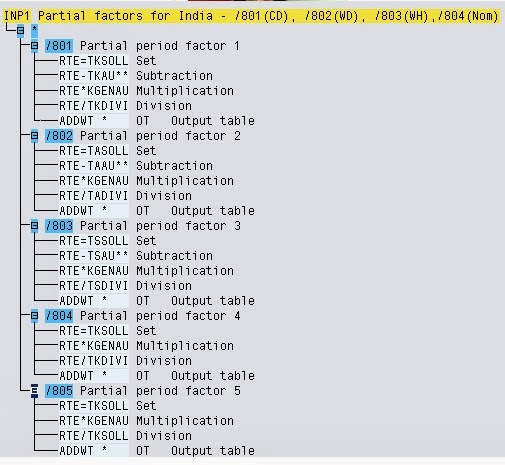
INP1

this is INP1 pcr


THIS PCR WE CAN COPY AS ZNP1 AND MODIFY ACCORDING TO YOUR CLIENT REQUIREMENT

/801-->FOR CALENDAR DAYS
/802==>WORKING DAYS
/803==>WORKING HOURS

WE PROVIDE EXCELLENT SAP HR/HCM TRAINING WITH REAL TIME SCENARIOS INCLUDING PROJECT BBP

FOR MORE DETAILS
FREE TO CALL  91 + 9912223430
madhupayrolll@gmail.com

Sunday, 2 February 2014

TR11 pcr

this is TR11 PCR
WE CAN COPY IT AND ADD TIME TYPES AS PER CLIENT REQUIREEMNT


We provide excellent sap hr/hcm trainings with real time sceanrios
for more details

madhupayroll@gmail.com
mobile: 9912223430